Configuration
Detailed configuration options for Contree MCP.
Authentication
The MCP server supports both auth modes the Contree API exposes — the
same two contree-cli recognises:
IAM (recommended). Token + Project header. Sends
Authorization: Bearer <iam-token>andProject: <project-id>. Default URL:https://api.tokenfactory.nebius.com/sandboxes. Use this for new deployments; the standardNEBIUS_API_KEY/NEBIUS_AI_PROJECTenv vars are honoured.JWT (legacy). Token only. Sends
Authorization: Bearer <jwt-token>. Used by thecontree.devPoC deployment. No project required.
A profile’s type = iam | jwt line picks the scheme; the client class
that issues backend requests is wired accordingly at startup.
Profile File (Recommended)
contree-mcp reads the same profile file that
contree-cli
writes, so a single login covers both tools. Install the CLI and run
contree auth:
uv tool install contree-cli   # or: pip install contree-cli
contree auth                  # interactive setup
This writes ~/.config/contree/auth.ini with mode 0600. Override
the directory with CONTREE_HOME.
The file is INI-format with one [profile:<name>] section per
credential set and a [DEFAULT] profile = <name> line selecting the
active profile:
[DEFAULT]
profile = default

[profile:default]
type = iam
url = https://api.tokenfactory.nebius.com/sandboxes
token = <TOKEN HERE>
project = <NEBIUS PROJECT ID>

[profile:staging]
type = jwt
url = https://contree.dev
token = <TOKEN HERE>
Switch profiles persistently with contree auth switch <name>, or
per-invocation with --profile <name> / CONTREE_PROFILE=<name>.
type = iam requires project; type = jwt does not.
Environment Variables (Per-Invocation Overrides)
For one-off overrides without touching the profile file:
export CONTREE_TOKEN="your-token-here"
export CONTREE_URL="https://api.tokenfactory.nebius.com/sandboxes"
export CONTREE_PROJECT="your-nebius-project-id"
The standard Nebius IAM credentials are recognised too:
export NEBIUS_API_KEY="your-iam-key"
export NEBIUS_AI_PROJECT="your-nebius-project-id"
Precedence (important)
Field-by-field, highest first:
CLI flags —
--token,--project,--url,--profile.CONTREE_*env vars —CONTREE_TOKEN/CONTREE_PROJECT/CONTREE_URL/CONTREE_PROFILE. MCP-specific; always layered on top of the profile.NEBIUS_*env vars —NEBIUS_API_KEY+NEBIUS_AI_PROJECT, recognised only when both are set (a complete IAM credential). A loneNEBIUS_API_KEYset ambiently for the Nebius SDK or terraform provider is ignored, and the MCP server logs aninfoline explaining why.Active profile from
auth.ini. Picked by, in order,--profile→CONTREE_PROFILE→ the file’s[DEFAULT] profile = ....
Some practical implications:
contree-mcp(no args) loads the active profile, even if your shell hasNEBIUS_API_KEYset for other tools.CONTREE_TOKEN=NEW contree-mcprotates the token but reuses the profile’sprojectandurl— handy for short-lived tokens.contree-mcp --token X --project Ypopulates token + project from the CLI;urlandauth_typestill come from the loaded profile unless--url/--auth-typeare also supplied.With no profile loaded and an incomplete
CONTREE_TOKEN/--token, the server stops with “No API token configured” rather than running with half-set credentials.
Token resolution order, per field:
token    --token   >  CONTREE_TOKEN   >  NEBIUS_API_KEY*   >  profile.token
project  --project >  CONTREE_PROJECT >  NEBIUS_AI_PROJECT* >  profile.project
url      --url     >  CONTREE_URL                          >  profile.url
                                                          >  IAM default (IAM only)
* NEBIUS_* are read only when both are set.
Tokens passed via env may appear in process listings — prefer the profile file for routine use.
Server Options
Option |
Environment Variable |
Default |
Description |
|---|---|---|---|
- |
|
|
Directory containing |
|
|
active profile from |
Profile to use |
|
|
from profile |
API token (overrides profile) |
|
|
from profile |
API base URL (overrides profile) |
|
|
from profile |
Project ID for IAM auth |
|
- |
|
|
|
- |
|
HTTP mode port |
|
- |
|
HTTP mode bind address |
|
- |
|
Logging level |
|
- |
- |
Print the User-Agent the server emits and exit |
- |
|
unset |
Disable the daily PyPI update check (set to any value) |
Cache Configuration
Option |
Default |
|---|---|
|
|
|
|
|
|
Client Configuration Examples
With credentials stored in ~/.config/contree/auth.ini, MCP client
configs are minimal:
Claude Code
claude mcp add --transport stdio contree -- $(which uvx) contree-mcp
HTTP Mode
For network access from other machines:
contree-mcp --mode http --http-port 9452 --http-listen 0.0.0.0
Visit http://localhost:9452/ for interactive documentation with setup guides, tool reference, and best practices.
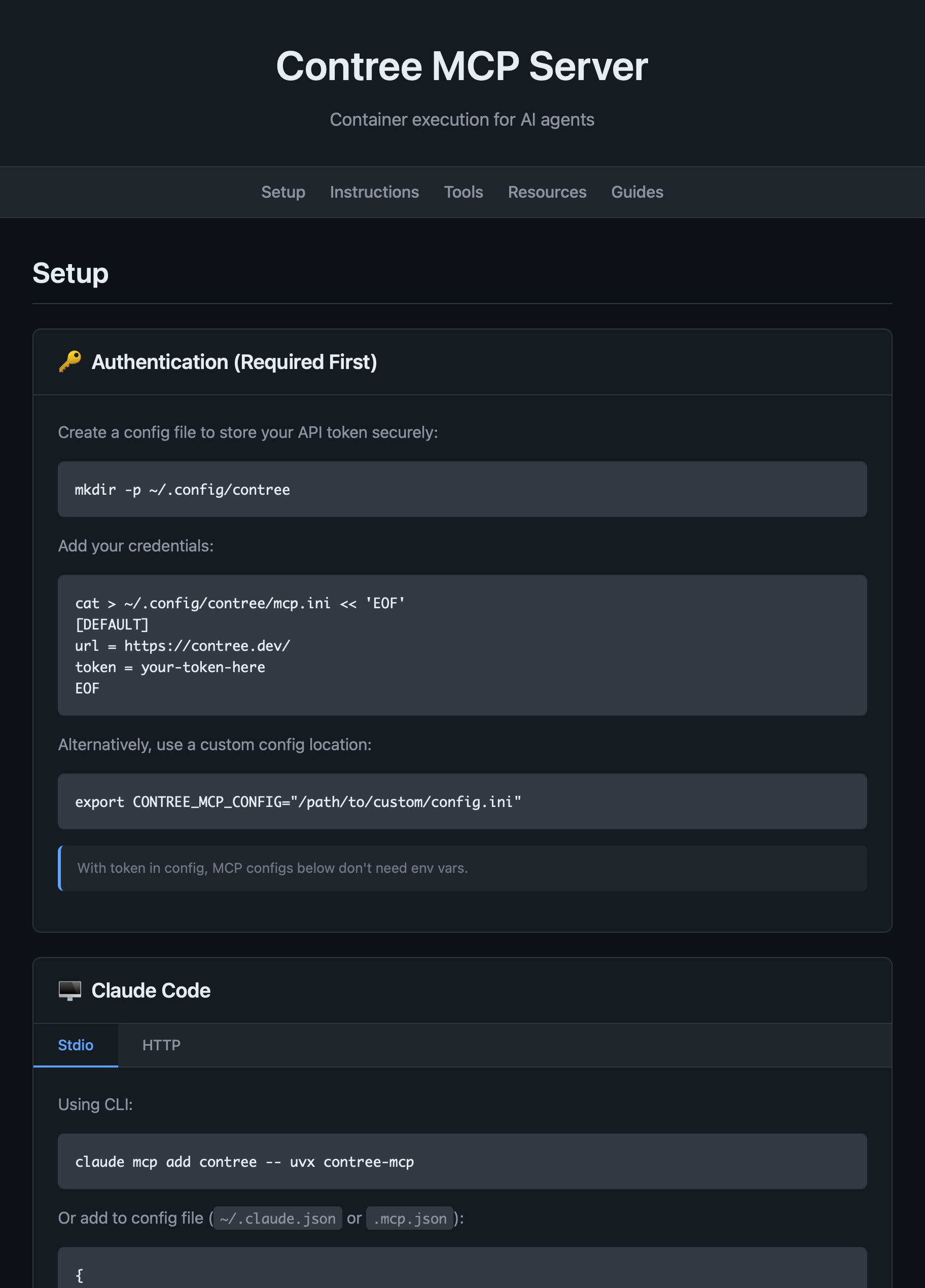
The HTTP interface showing Setup, Instructions, Tools, Resources, and Guides tabs.
Manual Installation
# Using uv
uv pip install contree-mcp

# Using pip
pip install contree-mcp

# Container environments (PEP 668)
pip install --break-system-packages contree-mcp